Every visa consultant knows the “Peak Season Panic.”
In the North American market, whether it’s the H-1B lottery rush in March, the F-1 student visa surge in July, or the relentless flow of tourist applications — Visa Season used to be the death of my sanity.
For years, my agency’s workflow was a manual nightmare. I’d have four monitors running simultaneously: one for the client’s blurry passport scan (usually a grainy JPG), one for their bank statements (a 50-page PDF), one for their messy CV (in Word), and the final one for the dreaded DS-160 or I-20 portal.
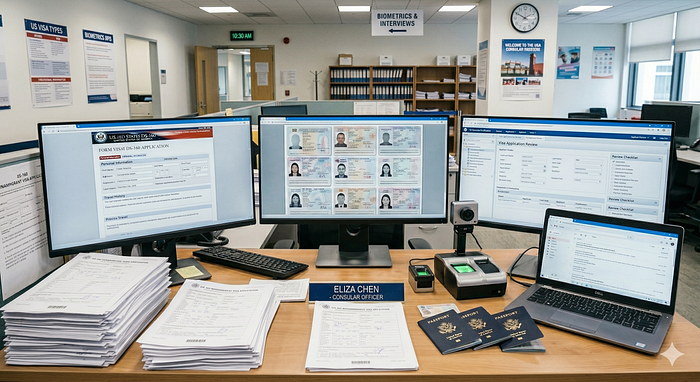
One typo in a passport number or a mismatched date of birth could mean a rejection, a lost year for a student, and a massive hit to our agency’s reputation. We hired interns, but the overhead of training them and auditing their manual errors was almost as exhausting as doing the work myself.
The OpenClaw Experiment: My First Brush with AI Agents
When OpenClaw (affectionately known as _The Lobster_) started trending, I was an early adopter. I thought, “Finally, an AI agent that can live on my desktop and handle my files!”
I started dumping client materials into the chat, hoping for a miracle. But I quickly hit a wall:
- The Format Barrier: OpenClaw is smart, but it’s not a mind-reader. It struggled with skewed PDF scans or complex Excel layouts. It would often hallucinate names or flip dates.
- Short-term Memory: These forms are long. By the time it reached the end of a multi-page application, it would “forget” details from the first page, leading to a mess of inconsistent data.
- The Accuracy Crisis: In our industry, “I think this is the right info” doesn’t cut it. I needed 100% traceability. I couldn’t risk my AI agent making up a plausible-looking but incorrect address.
Finding the Missing Piece: SnapFill
I realized that OpenClaw needed a specialized “brain” to handle the actual heavy lifting of data extraction. After digging through productivity forums, I found SnapFill.
I didn’t just want another AI; I needed a tool that understood structure. Here’s why SnapFill changed the game for my agency:
- It’s a Format Omnivore: It doesn’t matter if the source is a messy PDF, a photo of a government ID, or a complex spreadsheet. SnapFill parses it all with surgical precision.
- The “One-and-Done” Knowledge Base: This was the clincher. I can create a local, secure profile for a client once. Then, I can use that same data to fill out three different visa forms (US, UK, Schengen) without ever re-typing a single word.
- No More Hallucinations: Every field it fills is traceable. If the info isn’t there, it tells me. No “faking it,” which saves me a fortune in API tokens and hours of manual checking.
My New Secret Weapon: SnapFill for OpenClaw
The real magic happened when I installed the SnapFill for OpenClaw version. It turned the “Lobster” from a chatty assistant into a high-speed production line. Now, as a user, my “Visa Season” looks like this:
- The Dump: I drag the client’s messy files (ID, bank statements, CV) and the official form template directly into the OpenClaw chat.
- The Prompt: I simply tell it: _“Fill this out for me using SnapFill.”_
- The Output: I sit back and watch it populate the data accurately. It then spits out the completed form in the exact format I need — Word, PDF, or Excel.
The Result: Scaling Without the Burnout
Last month was our busiest on record. In the past, we would have been turning away urgent clients. This year? I handled a 300% volume increase with the exact same team.
The stress of manual data entry is gone. My clients are thrilled with the lightning-fast turnaround, and my interns are actually doing high-level consulting instead of playing “copy-paste” all day.
If you’re still manually filling out forms in 2026, you aren’t just working hard — you’re falling behind. If you’re already using OpenClaw, you _need_ to add this to your workflow. It’s the difference between riding the AI wave and getting wiped out by it.
Originally published on Medium.
 Blog
Blog 