_Parsing gets a document into Markdown. Agents need something more: navigable, source-grounded memory._
On May 7, 2026, we open-sourced the full Knowhere stack.
About a month later, the GitHub repo crossed 1,500 stars.
For an infrastructure-heavy, engineering-led project, that happened faster than we expected.
The interesting part is that Knowhere is not a flashy project. We did not release a new foundation model. We did not build another chat assistant. We focused on one of the least glamorous and most operationally difficult parts of making retrieval-augmented generation and AI agents work in production:
How do documents become knowledge that an agent can actually use?
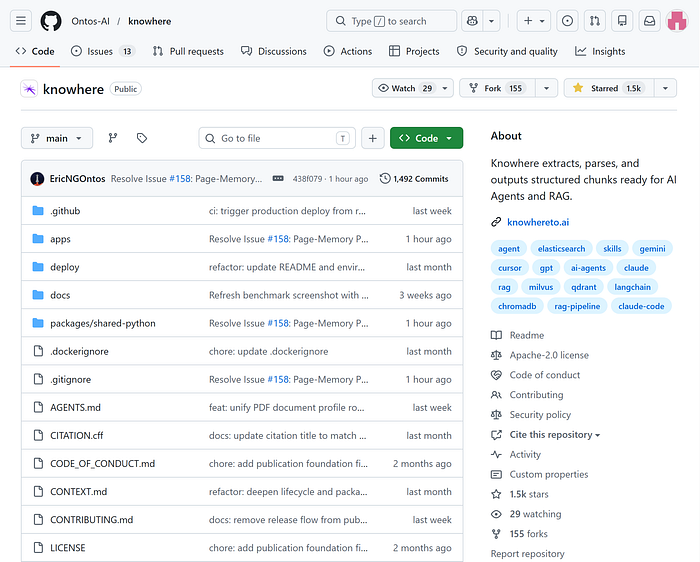
_Knowhere GitHub repository screenshot_
A lot of people ask the same question when they first see Knowhere:
_“Isn’t this just document parsing? How is it different from MinerU?”_
It is a fair question.
The answer explains why we built Knowhere in the first place.
MinerU Parses Documents. Knowhere Handles What Comes After Parsing.
MinerU is a strong document parsing tool.
It can extract text, headings, tables, and images from a PDF and convert them into Markdown or structured output. For many workflows, that step is already valuable.
But parsing a PDF into Markdown does not mean the document is ready for an agent.
The usual pipeline looks something like this:
_PDF -> Markdown -> chunks -> vector database -> retrieval -> LLM answer_
It looks clean. In practice, this is where many systems run into trouble.
A complex PDF has chapters, sections, tables, images, page references, captions, cross-page relationships, and sometimes multiple layers of layout. Once it is flattened into Markdown, a lot of that structure becomes weaker. Once it is chunked, each chunk becomes more isolated.
A chunk may no longer know which section it belongs to. It may not know what came before or after it. It may not know that the table next to it is the actual evidence. It may not know that the paragraph it contains is only explaining a figure on the previous page.
So when an agent retrieves from that corpus, it often gets a few fragments that look similar to the query. It does not know that Section 3.2 contains a comparison table, or that the paragraph it found is commentary on that table, or that the answer requires both.
The LLM is left stitching together fragments.
That is why teams can use a good parser and still feel disappointed with the final RAG result. The parser is not necessarily the problem. The problem is that the document was flattened before the agent ever saw it.
Knowhere exists to fill that gap.
It is not trying to be the next MinerU. It is trying to handle the step MinerU does not try to solve:
Turning parsed document output into long-term memory that an agent can navigate, cite, and reason over.
The Extra Step Knowhere Adds
Knowhere’s position is simple:
It is a memory layer between messy documents and AI agents.
Not just a parser.
Not just a chunker.
Not just a vector database wrapper.
It takes complex documents and turns them into structured, persistent memory that can keep being used after the initial parse.
Between parsing and vectorization, Knowhere adds a structure reconstruction pipeline.
First, it rebuilds document hierarchy.
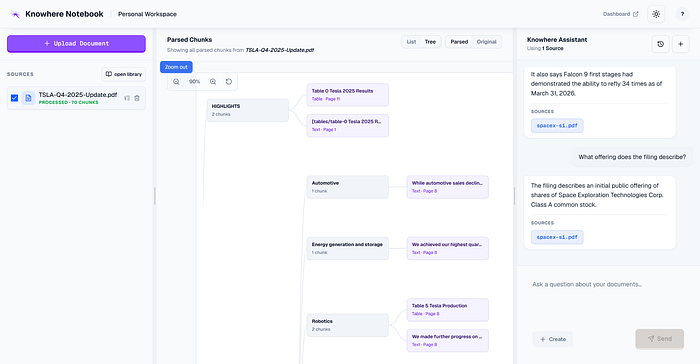
Knowhere uses a tree-like structure algorithm to recover section relationships. A chunk is no longer just a block of text. It knows which heading it sits under, what level it belongs to, and what its section path is.
Second, it handles multimodal content.
Images and tables are not treated as missing data or loose attachments. Knowhere runs OCR and descriptions on images, summarizes and structures tables, and links those assets back to the source chunks. When an agent retrieves evidence, it can retrieve the relevant chart or table context too, not just nearby prose.
Third, it builds a lightweight memory graph.
After a document is split into chunks, Knowhere stores navigation trees, summaries, graph links, and related metadata. The document is no longer a flat pile of text. It becomes a navigable knowledge structure. When multiple documents are uploaded, Knowhere can build relationships across them as well.
Fourth, it provides Agentic Retrieval.
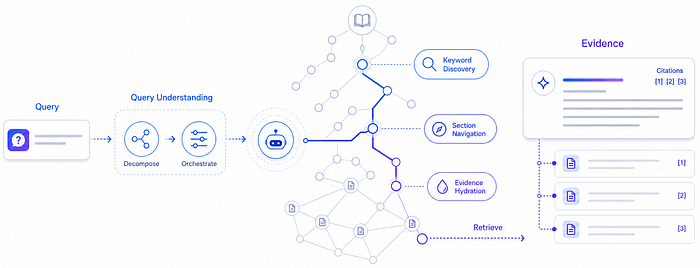
Traditional RAG often does vector similarity, returns top-k chunks, and hands them to an LLM. Knowhere combines keyword, path, content, and semantic signals. The agent can first find the relevant area, then move through the section tree and graph links, and finally return evidence with source paths.
That is the thing Knowhere does beyond MinerU.
MinerU turns a PDF into Markdown.
Knowhere turns parsed document output into memory an agent can use.
This is not a small feature difference. It is the missing middle of the document-to-agent pipeline.
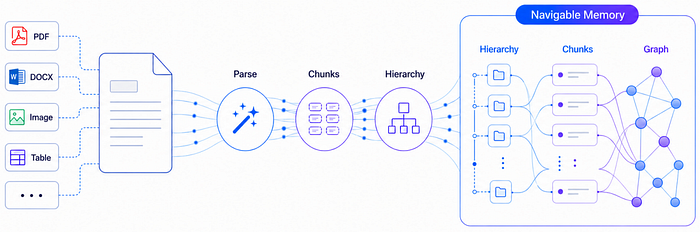
_Knowhere document memory pipeline diagram_
What Changed in the Results?
We ran internal evaluations on the same Agentic RAG tasks, comparing agents working from raw documents, ordinary parser output, and Knowhere’s structured memory.
The results were direct:
- First-pass accuracy improved by 36%.
- Recall improved by 11%.
- With feedback, accuracy reached 79%, compared with roughly 53% when using raw documents directly.
- Agents needed fewer loops, used fewer tokens, and completed tasks faster.
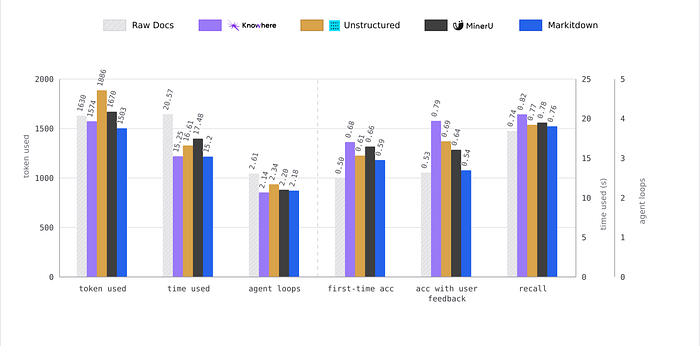
Internal evaluation chart comparing raw documents, Knowhere, Unstructured, MinerU, and Markitdown
The reason is not mysterious.
If the agent receives one undifferentiated block of text, it has to search blindly.
If the agent receives a tree, a graph, and chunks with source paths, it can work more like a person reading a document: inspect the outline, locate the right section, open the relevant details, and cite the evidence.
That is what structure buys you.
Where Knowhere Is Useful
If your AI application needs to use information from documents, Knowhere is relevant.
For internal knowledge bases, the source material is rarely clean text. It is product manuals, SOPs, FAQs, training decks, spreadsheets, PDFs, Word files, and mixed-format material. Knowhere turns those files into structured memory that agents can retrieve from.
For technical documentation assistants, the documents are often long and layout-heavy: equipment manuals, API docs, engineering drawings, and maintenance guides. Knowhere supports ultra-long PDFs and atlas-style documents, including technical manuals and drawing collections with hundreds of pages, routed through layout-aware parsing.
For contract and report analysis, context matters. Legal documents, financial reports, tenders, and research reports rely heavily on section logic, definitions, references, and exceptions. Flat chunking loses too many of those relationships. Section paths and evidence links make the output more stable.
For Agentic RAG, the need is even stronger. Many teams are no longer building simple Q&A. They want agents to complete multi-step work based on documents. That only works if the document itself is navigable, not just searchable.
Knowhere Is Not a MinerU Replacement
The cleaner way to say it is:
MinerU reads the document out.
Knowhere connects the document into an AI system.
MinerU is good at document parsing. It extracts text, headings, tables, and images, then produces Markdown or structured results. That is useful.
But if the goal is a RAG system or an agent knowledge base, parsing is only the first step. After that, you still need chunk organization, embeddings, indexing, retrieval logic, evidence references, document updates, and lifecycle management.
Knowhere’s value is that it keeps going after parsing.
It does not just give you a parsed file. It turns the document into retrievable memory that agents can use directly.
The main differences:
- Knowhere rebuilds document hierarchy instead of outputting flat text.
- It creates structured chunks with semantic context.
- It processes images and tables, then links multimodal content back to the source.
- It handles indexing and retrieval publication into queryable namespaces.
- It provides Agentic Retrieval, not just text for you to wire into a vector database.
- It supports document lifecycle management: update, query, and archive.
- It is model-agnostic. By default, it can use DeepSeek and Qwen-VL, and can be switched through environment variables to OpenAI, DashScope, Zhipu, Volcengine, and other providers.
- It is fully open source and self-hostable, which matters for teams whose data cannot leave their own environment.
One sentence version:
MinerU helps you read the document. Knowhere helps your agent use it.
Getting Started with Knowhere
There are three practical paths.
Path 1: Cloud API
Go to knowhereto.ai and create an account. New users currently get $5 in free credits, so you can try it without deploying anything.
Install the Python SDK:
pip install knowhere-python-sdk
Parse an online PDF:
import knowhere
client = knowhere.Knowhere(api_key="sk_your_key")
result = client.parse(url="https://example.com/report.pdf")
print(result.statistics.total_chunks)
print(result.full_markdown[:500])
Parse a local file:
from pathlib import Path
result = client.parse(
file=Path("report.pdf"),
parsing_params={"model": "advanced", "ocr_enabled": True},
)
print(result.manifest.source_file_name)
print(len(result.chunks))
print(result.document_id)
Access different chunk types:
for chunk in result.text_chunks:
print(chunk.keywords)
print(chunk.summary)
for chunk in result.table_chunks:
print(chunk.html[:100])
for chunk in result.image_chunks:
chunk.save("./output/")
Save all outputs:
result.save("./output/report/")
Path 2: Use It for RAG Retrieval
After parsing, you can publish a document to a namespace and query it through the retrieval API.
job = client.jobs.create(
source_type="url",
source_url="https://example.com/manual.pdf",
namespace="support-center",
)
job_result = client.jobs.wait(job.job_id)
document_id = job_result.document_id
if document_id is None:
raise RuntimeError("Expected document_id after successful publication.")
response = client.retrieval.query(
namespace="support-center",
query="How do I reset Bluetooth pairing?",
top_k=5,
channels=["path", "term"],
filter_mode="keep",
signal_paths=["Bluetooth", "Pairing"],
)
print(response.answer_text)
print(response.evidence_text)
for item in response.results:
print(item.content)
print(item.score)
print(item.source.source_file_name, item.source.section_path)
When a document has a new version, update it with the same document_id:
update_job = client.jobs.create(
source_type="url",
source_url="https://example.com/manual-v2.pdf",
document_id=document_id,
)
Archive it when it is no longer needed:
client.documents.archive(document_id)
Path 3: Self-Host
Use knowhere-self-hosted if your documents need to stay inside your own environment.
You will need:
- Docker and Docker Compose
- A MinerU API key for PDF parsing
- An LLM API key, either DeepSeek or Alibaba Cloud DashScope
Create a .env file in the project root.
Using DeepSeek:
MINERU_API_KEYS=your-mineru-api-key
DS_KEY=your-deepseek-api-key
Using DashScope:
MINERU_API_KEYS=your-mineru-api-key
ALI_API_KEYS=your-dashscope-api-key
NORMOL_MODEL=qwen-plus
HIERARCHY_LLM_MODEL=qwen-plus
IMAGE_MODEL=qwen3.6-flash
IMAGE_MODEL_MAX=qwen3.6-flash
Multiple keys can be comma-separated. Knowhere rotates them automatically to reduce rate-limit pressure on a single key:
MINERU_API_KEYS=mineru-key-1,mineru-key-2
If pulling images is slow in mainland China, use the Alibaba Cloud mirror:
KNOWHERE_IMAGE=knowhere-registry.cn-shenzhen.cr.aliyuncs.com/knowhere/knowhere:latest
Start the stack:
docker compose up -d
After startup:
Dashboard: http://localhost:3000/login
API health check: http://localhost:5005/health
API docs / Swagger: http://localhost:5005/docs
Common commands:
docker compose ps
docker compose logs -f app
docker compose pull && docker compose up -d
docker compose down
The self-hosted version sends anonymous product telemetry by default. It does not include document content, filenames, user identity, or other sensitive data. To disable it:
TELEMETRY_ENABLED=false
The Point
Knowhere crossed 1,500 stars in about a month not because of storytelling alone, but because a lot of teams are stuck in the same place:
They have parsed their documents.
Their agents still cannot use them well.
The missing step is not glamorous. It is structure.
Markdowns, images, tables, section hierarchy, cross-document links, and source paths need to be organized into memory that an agent can navigate, retrieve from, and cite.
That is the step Knowhere adds.
In production AI, model capability is only the beginning. The experience depends on whether the model gets the right knowledge, with the right structure, from the right source.
If you are building RAG, document Q&A, internal knowledge bases, or agent tooling, Knowhere is open source and ready to try.
Originally published on Medium.
 Blog
Blog 